
VOIP Headsets
Yealink YHA-EH-ET, EarHook for WH63/67 (1pcs) and Eartips for WH63/67 (8pcs) packaged with case

Item Specifications
<h1 style='color:#349C74;font-family:arial;margin: -5px 0px'>Yealink EarHook for WH63/67</h1><div style='text-align:justify;'>
<h2 style='color:#46a8ca;text-align:center;font-family:arial;margin: -20px 0px'>IPY-YHA-EH-ET</h2><div style='text-align:justify;'>
The YHA-EH-ET contains one earhook and four pairs of eartips for Yealink WH63/WH67 DECT Convertible Wireless Headsets.
The earhook helps secure the WH63/WH67 on the ear, preventing interruptions during a call. It has four pairs of eartips, each with a unique design and size. It lets users pick the one that best fits their ears, ensuring all-day wearing comfort.
Instruction:
For Right ear
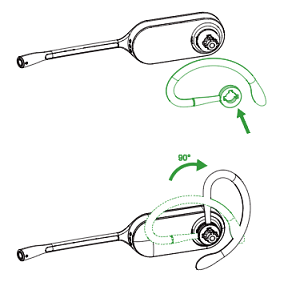
1. Align the earhook ( insert it onto the headset. Be sure the earhook is flat against the headset and rotate the earhook up 90°.
<div style='padding:0.0px 0.0px;text-align: center; display:block;'>
<img src='https://content.leadermarketing.com.au/assets/uploads/e1.png' width='100%' height='auto'>
</div>
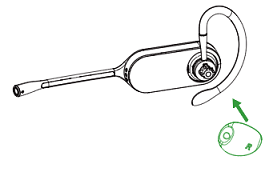
2. Choose the size of eartip that fits most comfortably. Align the eartip with the notch facing the microphone as shown. Press on to attach.
<div style='padding:0.0px 0.0px;text-align: center; display:block;'>
<img src='https://content.leadermarketing.com.au/assets/uploads/e2.png' width='100%' height='auto'>
</div>
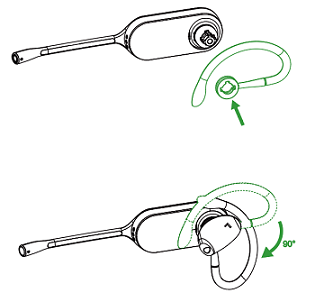
For Left ear:
The difference between the right ear and the left ear assembly is that the direction of the earhook is different.
<div style='padding:0.0px 0.0px;text-align: center; display:block;'>
<img src='https://content.leadermarketing.com.au/assets/uploads/e3.png' width='100%' height='auto'>
</div>
<h2 style='color:#46a8ca;text-align:center;font-family:arial;margin: -20px 0px'>IPY-YHA-EH-ET</h2><div style='text-align:justify;'>
The YHA-EH-ET contains one earhook and four pairs of eartips for Yealink WH63/WH67 DECT Convertible Wireless Headsets.
The earhook helps secure the WH63/WH67 on the ear, preventing interruptions during a call. It has four pairs of eartips, each with a unique design and size. It lets users pick the one that best fits their ears, ensuring all-day wearing comfort.
Instruction:
For Right ear
1. Align the earhook ( insert it onto the headset. Be sure the earhook is flat against the headset and rotate the earhook up 90°.
<div style='padding:0.0px 0.0px;text-align: center; display:block;'>
<img src='https://content.leadermarketing.com.au/assets/uploads/e1.png' width='100%' height='auto'>
</div>
2. Choose the size of eartip that fits most comfortably. Align the eartip with the notch facing the microphone as shown. Press on to attach.
<div style='padding:0.0px 0.0px;text-align: center; display:block;'>
<img src='https://content.leadermarketing.com.au/assets/uploads/e2.png' width='100%' height='auto'>
</div>
For Left ear:
The difference between the right ear and the left ear assembly is that the direction of the earhook is different.
<div style='padding:0.0px 0.0px;text-align: center; display:block;'>
<img src='https://content.leadermarketing.com.au/assets/uploads/e3.png' width='100%' height='auto'>
</div>
SKU CODE: IPY-YHA-EH-ET
WAREHOUSE STOCK: 15 units left
Unit Price
$24.15